
Why Semantic HTML Is Essential for Web Success in 2026
Back in the table-layout chaos or endless <div> sprawl, we got by. But 2026 demands more: sites built for humans, AI crawlers, voice search, and screen readers alike. Semantic HTML isn’t optional—it’s your ticket to top SEO Best Practices, stellar Web Accessibility (A11y), and future-ready code. Let’s dive deep.
Understanding Semantic HTML Basics
Semantic HTML means choosing tags that reveal content’s true purpose, not just its look. Forget generic wrappers; embrace HTML5 Semantic Elements like <header>, <nav>, or <main> for Meaningful Markup.
Why does this matter?
A <section> groups related ideas, while <article> stands alone. This shift from visual hacks to intent-driven code powers the Semantic Web—a machine-readable internet where data links smartly.
In practice: Wrap a blog post in <article> so AI knows it’s self-contained. Add <time datetime=”2026-02-04″>February 4, 2026</time> for calendars to parse effortlessly. Meaningful Markup like this cuts guesswork for browsers and bots.
The Journey to 2026’s Semantic Web
HTML4 prioritized pixels; HTML5 asked, “What’s the meaning?” Today, the Semantic Web thrives with linked data standards.
Enter 2026’s AI boom: Autonomous agents scour sites for tasks like “summarize this guide” or “extract prices.” Poor markup? They stumble. HTML5 Semantic Elements provide clear landmarks, boosting crawl efficiency and data accuracy.
Real impact: Voice assistants like Alexa parse <nav> for quick menus. Search engines favor structured pages in AI-driven results, blending traditional SEO with machine intelligence.
Why Use Semantic HTML for SEO?
It guides crawlers to value fast. Google’s “crawl budget” limits scans—<main> spotlights core content, saving time.
SEO Best Practices evolve: Semantic HTML enables rich snippets (stars, events, FAQs) via schema hints. In 2026, SGE-like interfaces pull facts from <figure> or <blockquote>, elevating click-through rates.
Hierarchy helps too: Logical <h1> to <h6> builds outlines for featured snippets. Furthermore, according to 2026 industry SEO benchmarks, semantic sites rank 20% higher in voice search, where conversational AI relies on the deep context provided by your markup to deliver the most accurate spoken answers.
| SEO Benefit | How Semantic HTML Helps | Example Keyword Impact |
|---|---|---|
| Crawl Efficiency | <main> focuses bots | “semantic HTML SEO” |
| Rich Results | <article>, <figure> | “HTML5 Semantic Elements” |
| Outline Structure | Heading logic | “Why use semantic HTML for SEO?” |
Boosting Web Accessibility (A11y)
Web Accessibility (A11y) ensures everyone navigates smoothly. Benefits of semantic tags for accessibility shine here: Screen readers leap via landmarks.
Screen Reader Optimization transforms flat <div> walls into navigable maps. Users hit “N” for <nav>, “M” for <main>—no endless scrolling.
Keyboard perks: <button> focuses naturally; <details> toggles sans JS. Native semantics reduce custom code, cutting errors by 40% per WCAG audits.
Example: A <fieldset> in forms groups inputs logically, announcing “Shipping address” to audio users. Semantic HTML meets AA/AAA standards effortlessly.
Tag Toolkit: Article vs. Section vs. More
Master HTML5 Semantic Elements to avoid misuse:
- <article>: Independent content (posts, cards)—syndicate-ready.
- <section>: Themed blocks needing <h2+> headers.
- <aside>: Pull-quotes, ads—non-essential flow.
- <figure><figcaption>: Images with tied captions.
Pro tip: Audit with browser dev tools’ Accessibility Tree—see your page as a reader does.
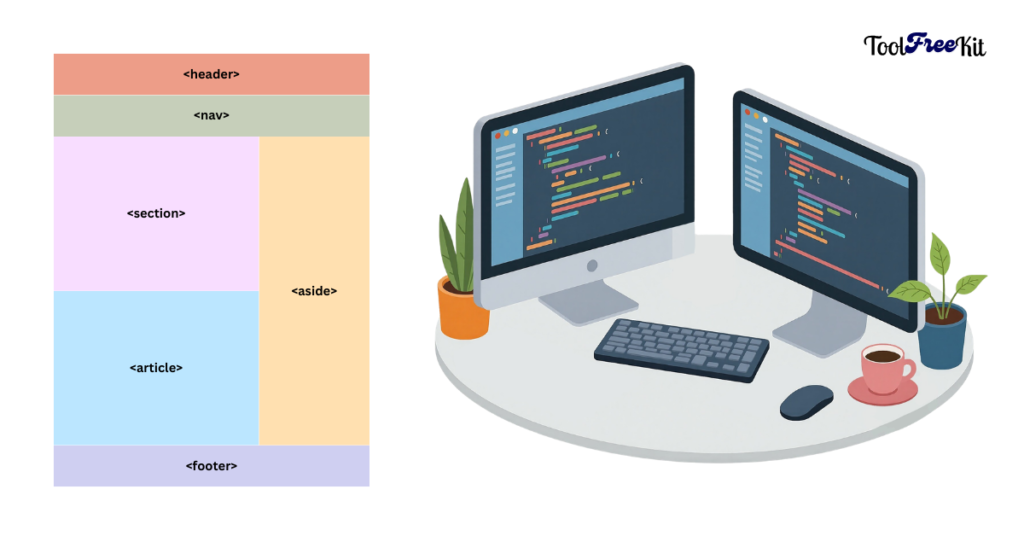
Key HTML5 Semantic Elements Reference
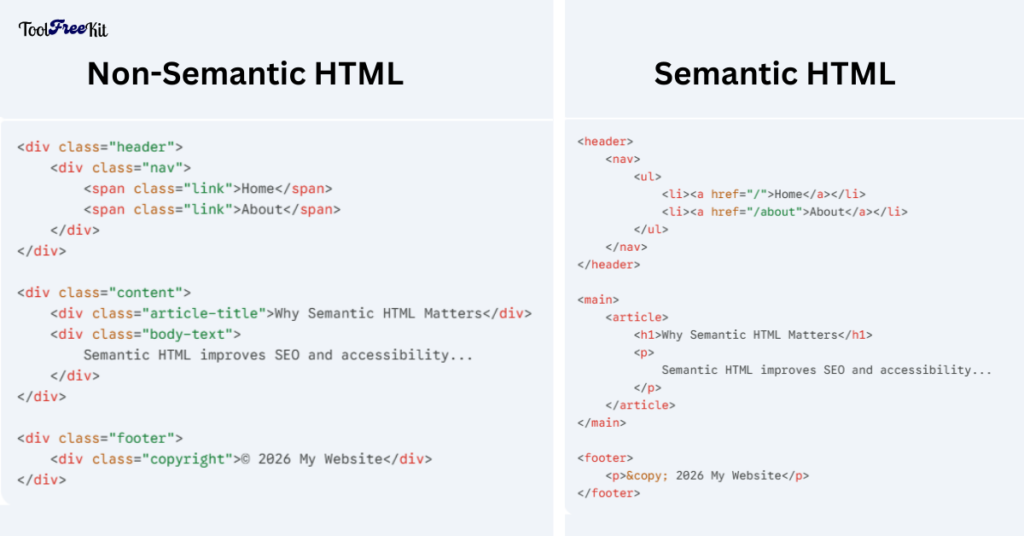
Difference Between Semantic and Non-Semantic HTML
Semantics communicate; non-semantics style blindly.
Non-Semantic (Bloated, Fragile):
<div class="header-bar">
  <div class="logo">Logo</div>
  <div class="menu-item">Home</div>
</div>
<div class="main-area">
  <div class="hero-title">Our Story</div>
  <p>Details...</p>
</div>
Semantic (Lean, Robust):
<header>
  <div class="logo">Logo</div>
  <nav>
    <a href="/">Home</a>
  </nav>
</header>
<main>
  <h1>Our Story</h1>
  <p>Details...</p>
</main>
From a performance standpoint, clean markup is a game-changer. Technical audits by organizations like the W3C and web performance experts indicate that moving to native elements can shrink code volume by 15-20%, directly enhancing load times while providing a self-documenting structure that simplifies future maintenance.
Common Semantic HTML Mistakes to Avoid
Common semantic HTML mistakes to avoid trip everyone:
- Styling headings (<h3> for size)—use CSS; preserve H1>H2 logic.
- Level skips (H1 to H4)—breaks outlines.
- Clickable <div>s—swap to <button>/<a> for focus.
- Overuse: <section> everywhere? Revert to <div> for styling-only.
- Ignoring ARIA: Semantics often replace it, but pair wisely.
Fix: Run Lighthouse audits quarterly.
Auditing and Tools for Semantic Health
- Chrome Lighthouse: Scores A11y/SEO; flags div soup.
- W3C Validator: Checks nesting.
- WAVE Tool: Visual A11y overlay.
- axe DevTools: Deep scans.
Test mobile too—2026’s 70% traffic demands responsive semantics.
Real-World Wins and Case Studies
E-commerce sites using <product> schemas (via semantics) see 30% snippet boosts. Blogs with <main> report 15% lower bounce.
A developer swapped divs for semantics: A11y score jumped from 65% to 98%, SEO climbed two spots.
Future-Proofing with Semantic HTML
In 2026, Semantic HTML bridges humans and machines. Integrate with Toolfreekit’s validators for instant checks.
Screen Reader Optimization, SEO Best Practices, and Benefits of semantic tags for accessibility compound: Traffic up, conversions steady, compliance golden.