
Decoding the Digital Square: Your Ultimate Guide to QR Code Scanners
In a world increasingly reliant on digital interactions, a small, unassuming square has become a ubiquitous symbol of instant information access: the QR code. From restaurant menus to product packaging, marketing campaigns to payment portals, these intricate patterns are everywhere. But how do we unlock the information they hold? Enter the QR code scanner, a technology that has evolved from a niche tool to an indispensable everyday utility.
This comprehensive guide will demystify QR code scanners, exploring their functionality, diverse applications, and how to harness their power effectively. We’ll also delve into their history, the underlying technology, and what the future holds for these versatile digital gateways.
What Exactly is a QR Code?
Before we dive into scanners, let’s briefly understand their counterpart. QR stands for “Quick Response.” Invented in 1994 by Masahiro Hara of Denso Wave, a Japanese subsidiary of Toyota, QR codes were initially designed to track automobile parts during manufacturing. Unlike the one-dimensional barcode, which can only store a small amount of information horizontally, the two-dimensional QR code can store data both horizontally and vertically. This allows for significantly more information to be encoded, including URLs, text, contact information, Wi-Fi credentials, and even small files.
The distinctive checkerboard pattern is not random; it’s a carefully structured arrangement of modules (the small squares) that represent binary data. Error correction capabilities are also built-in, meaning a QR code can still be scanned even if a portion of it is damaged or obscured.
The Magic Behind the Scan: How QR Code Scanners Work
At its core, a QR code scanner is a device or application that “reads” the visual information within a QR code and translates it into a human-readable format or executable action.
Here’s a simplified breakdown of the scanning process:
- Image Capture: The scanner, typically a camera on your smartphone or a dedicated scanner device, captures an image of the QR code.
- Pattern Recognition: Software within the scanner identifies the three large “finder patterns” (square markers at three corners) of the QR code. These patterns help the scanner determine the orientation and size of the code.
- Gridding and Module Detection: Once the orientation is established, the scanner overlays a grid onto the QR code. It then analyzes each individual module (black and white squares) within the grid.
- Data Extraction: Each black module represents a binary ‘1’ and each white module represents a ‘0’ (or vice versa, depending on the standard). The scanner reads this binary data.
- Error Correction: The scanner utilizes the error correction codes embedded within the QR code to reconstruct any missing or corrupted data. This ensures a successful scan even if the code isn’t perfectly pristine.
- Data Interpretation and Action: Finally, the extracted binary data is decoded into its original format – a URL, text, contact card, etc. The scanner then performs the corresponding action, such as opening a web browser, displaying text, or prompting you to add a contact.
The Evolution of QR Code Scanners: From Dedicated Devices to Smartphones
Initially, scanning QR codes required dedicated handheld scanners, often found in industrial or retail settings. These devices were bulky and expensive, limiting their widespread adoption for consumer use.
The real game-changer arrived with the proliferation of smartphones. Modern smartphones, equipped with high-resolution cameras and powerful processors, became the perfect platform for QR code scanning.
Here’s how different types of QR code scanners operate:
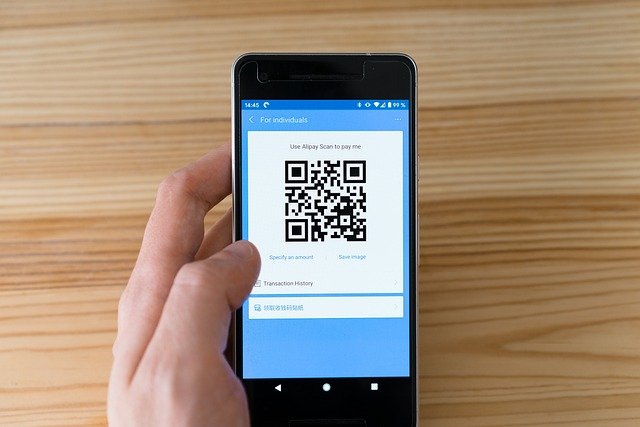
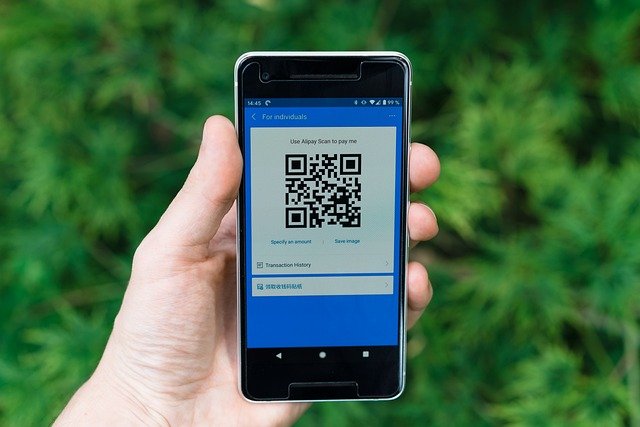
- Smartphone Camera Apps: For most users, their smartphone’s native camera app is the primary QR code scanner. Many Android and iOS devices have built-in QR code recognition directly within the camera interface. Simply open your camera, point it at a QR code, and a notification or pop-up will appear, prompting you to take action.
- Third-Party QR Scanner Apps: While native camera functionality is convenient, dedicated QR scanner apps often offer additional features. These can include:
- Scan History: Keeping a record of all your scanned codes.
- Flashlight Integration: For scanning in low-light conditions.
- Barcode Scanning: Many QR scanner apps can also scan traditional barcodes.
- QR Code Creation: Some apps allow you to generate your own QR codes.
- Enhanced Security Features: Warning against malicious URLs.
- Web-Based QR Scanners: You can also find websites that act as QR code scanners. You typically upload an image of a QR code, and the website decodes it for you. These are useful if you encounter a QR code in a digital document or image.
- Industrial and Retail Scanners: These are the specialized, robust devices still used in logistics, inventory management, and point-of-sale systems. They are designed for high-volume, rapid scanning in demanding environments.
The Myriad Applications of QR Code Scanners
The versatility of QR codes, coupled with the ease of scanning, has led to their adoption across an incredibly diverse range of applications:
- Marketing and Advertising:
- Product Information: Scanning a code on packaging to access nutritional facts, user manuals, or customer reviews.
- Promotions and Discounts: Linking to special offers, coupons, or loyalty programs.
- Interactive Print Media: Bridging the gap between physical advertisements (magazines, posters) and digital content (videos, websites).
- Event Promotion: RSVP links, schedule details, or virtual tours for events.
- Business and Retail:
- Contactless Menus: Restaurants replacing physical menus with QR codes linking to digital versions.
- Payment Systems: Scan-to-pay options at checkout, particularly prevalent in Asia.
- Inventory Management: Tracking goods in warehouses and retail stores.
- Customer Feedback: Direct links to surveys or review platforms.
- Wi-Fi Access: Simplified connection to public or private Wi-Fi networks without manually entering passwords.
- Information Sharing:
- Contact Information (vCards): Sharing business cards digitally with a single scan.
- Educational Resources: Linking to supplementary materials, videos, or quizzes in classrooms or museums.
- Tourism: Providing historical facts, maps, or audio guides at tourist attractions.
- Public Services: Accessing government forms, public health information, or transportation schedules.
- Personal Use:
- Sharing Links: Quickly sharing website URLs, social media profiles, or YouTube videos.
- Personalization: Adding QR codes to invitations, gifts, or even pet tags (linking to owner contact info).
- Home Automation: Controlling smart devices or accessing instructions.
Tips for Effective QR Code Scanning
While generally straightforward, a few tips can enhance your QR code scanning experience:
- Good Lighting: Ensure the QR code is well-lit and free from shadows.
- Steady Hand: Hold your device steady to prevent blur.
- Optimal Distance: Hold your device at a moderate range — not too near and not too far. Most scanners work best when the code fills a reasonable portion of the screen.
- Clean Lens: A smudged camera lens can impair scanning.
- Flat Surface: Scans are more reliable on flat, uncreased QR codes.
- Check for Damage: If a code is significantly torn, creased, or defaced, it might not scan. However, remember the error correction helps with minor damage.
- Be Wary of Suspicious Codes: Always exercise caution. If a QR code appears in an unexpected or unsolicited context, think twice before scanning, as it could lead to malicious websites or downloads.
The Future of QR Codes and Scanners
The journey of the QR code is far from over.As technology keeps evolving, we are likely to witness more advanced innovations:
- Enhanced Security: More robust security protocols embedded within QR codes to combat phishing and malware.
- Augmented Reality (AR) Integration: QR codes triggering AR experiences, overlaying digital content onto the real world when scanned. Imagine scanning a product and seeing a 3D model appear on your table.
- Dynamic QR Codes: Codes whose linked content can be changed even after the code has been printed, offering greater flexibility for marketing and information dissemination.
- Invisible QR Codes: Research is ongoing into embedding QR codes that are imperceptible to the human eye but scannable by specialized devices or even future smartphone cameras.
- Further Integration with IoT: Seamless interaction with smart homes and internet-connected devices.
The humble QR code, paired with its intelligent scanner, has quietly revolutionized how we interact with the digital world. From its origins in automotive factories to its omnipresence in our daily lives, it serves as a testament to simple yet powerful innovation. Understanding how to use these scanners effectively not only streamlines our access to information but also connects us more deeply to the ever-evolving digital landscape. So next time you see that pixelated square, don’t hesitate – unlock its secrets with a quick scan. You might be surprised at the world of information it reveals.